Compiling whisper.cpp from source for remote transcription
We suggest you use this guide if you are unable to use
ghost-story, our official remote transcription solution.
Storyteller makes some specific assumptions about that specific setup when using
the whisper.cpp (remote) transcription option which can provide a better
transcription experience.
You can compile whisper.cpp locally to take advantage of GPU acceleration
available on your machine. This can speed up transcription compared to the
default CPU implementation without using a cloud service.
The overall goal is to run whisper.cpp's built-in web server directly on your
machine ("bare metal"), while running Storyteller in a Docker container as
usual. Choose a build path that matches your hardware: CPU is simpler to set up,
while GPU is faster on supported hardware.
0. Prerequisites
- Windows
- macOS
The commands in this guide are written for PowerShell. Run PowerShell as Administrator only when installing prerequisites.
winget install Git.Git
winget install Kitware.CMake
winget install ffmpeg
You will also need the Visual Studio Build Tools with the Visual C++ workload installed.
brew install cmake git ffmpeg
1. Clone whisper.cpp
- Windows
- macOS
cd C:\
git clone https://github.com/ggml-org/whisper.cpp.git
cd C:\whisper.cpp
git clone https://github.com/ggml-org/whisper.cpp.git
cd whisper.cpp
2. Download a model
Smaller models use less VRAM and are faster. Larger models are more accurate but
require more VRAM. If you're not sure which model you need, start with tiny.en
for English and large-v3-turbo for other languages. If you have issues with
alignment using tiny, try upgrading to large-v3-turbo.
- Windows
- macOS
Download a model file from the
whisper.cpp model repository on Hugging Face
and place the .bin file in the whisper.cpp folder.
sh ./models/download-ggml-model.sh tiny.en
Available models: tiny.en, tiny, base.en, base, small.en, small,
medium.en, medium, large-v1, large-v2, large-v3, large-v3-turbo.
3. Building
- Windows
- macOS
- CPU
- NVIDIA (CUDA)
- AMD (HIP/ROCm)
- Vulkan
- OpenVINO
cmake -B build
cmake --build build -j --config Release
Download the CUDA Toolkit and note the install path.
cmake -B build -DGGML_CUDA=1 -DCUDAToolkit_ROOT="C:\Program Files\NVIDIA GPU Computing Toolkit\CUDA\vXX.X"
cmake --build build -j --config Release
Update the toolkit path and version to match your installation.
Install the AMD HIP SDK for Windows.
cmake -B build -DGGML_HIP=ON
cmake --build build -j --config Release
Download the Vulkan SDK.
cmake -B build -DGGML_VULKAN=1
cmake --build build -j --config Release
This requires Python. Follow the OpenVINO support section in the whisper.cpp README.
To use CoreML acceleration you need to set up a Python environment and install
the required dependencies. Using uv:
uv venv
source ./venv/bin/activate
uv pip install ane_transformers openai-whisper coremltools
You will also need the full Xcode application from the App Store (not just the CLI tools). To ensure you are using the correct version:
sudo xcode-select --switch /Applications/Xcode.app/Contents/Developer
Build whisper.cpp with CoreML support:
cmake -B build -DWHISPER_COREML=1
cmake --build build -j --config Release
Convert the model to CoreML format:
export MODEL_NAME=tiny
./models/generate-coreml-model.sh $MODEL_NAME
Replace tiny with the model you downloaded in the previous step.
See the whisper.cpp documentation for more information on other acceleration options.
4. Running the server
- Windows
- macOS
Use a .bat file to start the server so you can switch models or settings
quickly. Update the model file name before running.
- CPU
- NVIDIA (CUDA)
- AMD (HIP/ROCm)
- Vulkan
- OpenVINO
@echo off
cd /d C:\whisper.cpp
start "" /b build\bin\Release\whisper-server.exe -m ggml-large-v3-turbo.bin --host 0.0.0.0 --port 8080 --inference-path /audio/transcriptions --convert > whisper-server.log 2>&1
echo Whisper server started in background
echo Logs: C:\whisper.cpp\whisper-server.log
@echo off
cd /d C:\whisper.cpp
set "PATH=C:\Program Files\NVIDIA GPU Computing Toolkit\CUDA\vXX.X\bin;%PATH%"
start "" /b build\bin\Release\whisper-server.exe -m ggml-large-v3-turbo.bin --host 0.0.0.0 --port 8080 --inference-path /audio/transcriptions --convert > whisper-server.log 2>&1
echo Whisper server started in background with CUDA support
echo Logs: C:\whisper.cpp\whisper-server.log
Update the CUDA toolkit path and version to match your installation.
@echo off
cd /d C:\whisper.cpp
start "" /b build\bin\Release\whisper-server.exe -m ggml-large-v3-turbo.bin --host 0.0.0.0 --port 8080 --inference-path /audio/transcriptions --convert > whisper-server.log 2>&1
echo Whisper server started in background
echo Logs: C:\whisper.cpp\whisper-server.log
@echo off
cd /d C:\whisper.cpp
start "" /b build\bin\Release\whisper-server.exe -m ggml-large-v3-turbo.bin --host 0.0.0.0 --port 8080 --inference-path /audio/transcriptions --convert > whisper-server.log 2>&1
echo Whisper server started in background
echo Logs: C:\whisper.cpp\whisper-server.log
@echo off
cd /d C:\whisper.cpp
start "" /b build\bin\Release\whisper-server.exe -m ggml-large-v3-turbo.bin --host 0.0.0.0 --port 8080 --inference-path /audio/transcriptions --convert > whisper-server.log 2>&1
echo Whisper server started in background
echo Logs: C:\whisper.cpp\whisper-server.log
Check whisper-server.log for device initialization. Example output for NVIDIA:
ggml_cuda_init: found 1 CUDA devices:
  Device 0: NVIDIA GeForce RTX 5070 Ti, compute capability 12.0, VMM: yes
./build/bin/whisper-server -m models/ggml-$MODEL_NAME.bin \
  --host 0.0.0.0 \
  --inference-path /audio/transcriptions \
  --suppress-nst \
  --convert
Key flags:
-mspecifies the model file path.--host 0.0.0.0allows access from other devices on the network.--inference-path /audio/transcriptionsmatches the URL that Storyteller expects.--convertallows the server to accept non-wavfiles.--portoverrides the default port (8080) if another service is using it.--suppress-nst(required) suppresses non-speech tokens. May result in alignment issues if omitted.--flash-attn(optional) enables flash attention. May result in faster transcription--processors(optional) sets the number of processors to use. Defaults to 1, but can be increased for faster transcription.
Increasing the number of processors may drastically speed up transcription, but it may also result in alignment issues. Please do not raise an alignment issue if you have increased the number of processors.
5. Configuring Storyteller
In the Storyteller settings, under "Transcription settings", set the following:
- "Transcription engine" to "
whisper.cpp (remote)" - "API Key" can be left empty or set to any string, as the local server does not require authentication.
- "Base URL" to the URL of the whisper.cpp server, for example
http://192.168.2.40:8080.
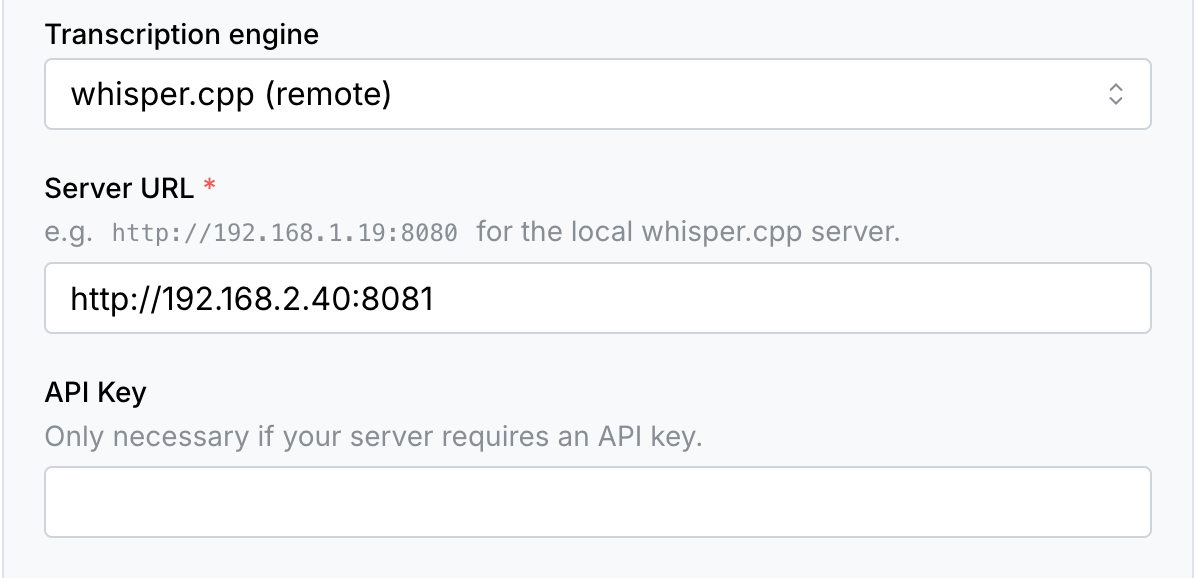
The default port is 8080 but you can change it with the --port flag.
Determining the server host
The base URL must contain the IP address or hostname of the machine running the whisper.cpp server.
Storyteller in Docker (macOS or Windows): use host.docker.internal as the
hostname.
Storyteller in Docker (Linux): run the container with
--add-host=host.docker.internal:host-gateway and use host.docker.internal,
or use --network=host and localhost.
Storyteller on the same machine: use localhost.
Storyteller on a different machine: find the server's IP address with
ifconfig (macOS) or ipconfig (Windows) and look for addresses starting with
192.168..