Aligning books
Requirements
In order to produce an aligned book, Storyteller needs three things:
- An EPUB book. EPUB is an open file format for ebooks, and most online book stores will provide EPUB files for their books, though many unfortunately still use DRM ("Digital Rights Management"). Storyteller cannot work with books that are locked with DRM. ACSM files, AZW4 files, Mobipocket files, Apple Fairplay encrypted EPUBs, etc, will not work with Storyteller.
- An audiobook. This can either be provided as any number of MP4, M4A, M4B, or MP3 files, or any number of ZIP archives of files of those types. If providing multiple files, it's best to ensure that they're alphanumerically ordered. Again, these files must not be protected by DRM; Storyteller cannot process or strip DRM-protected files.
- For these files to be paired as a set and identified as a single "book". If you upload them together, or have them in the same folder in a watch folder, Storyteller does this for you automatically. If not, you can match them together via the web server.
Preparing books for alignment
If you import both versions at the same time or auto-import them in the same folder, they will appear as a single item in the library represented with a dual thumbnail.

If they are imported at different times, you will need to match them together first. For detailed instructions on matching books, revisit the adding books page.
Aligning
Once you have a matching ebook and audiobook properly paired in Storyteller, you can align the text and the audio. This can be done via two routes: on the details page (just click the "Create readaloud" button) or via bulk actions (select "begin processing"). They both perform the same function.
If using the bulk actions method and aligning for the first time, there is no difference between the two options as no cached files will have been created yet.
Once a book is successfully aligned
- The readaloud book will be preferentially downloaded to mobile devices for both reading and listening, although you can force select either the EPUB and/or audiobook if you want.
- The readaloud icon will appear next to the title underneath the thumbnails and in the external download function.
- The book will be listed as aligned on the details page. By clicking the icon
next to aligned, you now have the ability to
- Reprocess the book using cached files — if your readaloud was corrupted for some reason or did not sync properly, or if there have been signficant updates to the alignment process, and you have a book that has failed to align properly in the past.
- Delete the cache and reprocess from source files — if there are errors in the transcription, and you want to use a more robust model, you might choose this action
- Delete cached files — if you are short on space and certain you are happy with your readaloud, you can delete the transcriptions and the transcoded/pre-processed audio files.
- Delete source and cache files - if you really want to delete everything you can, but be sure you have a backup of your source files before choosing this option!
Speeding up the alignment process
Storyteller can run entirely on your hardware, which means the length of the alignment process will vary depending on your hardware. Most of the processing time is made up by the automated transcription of the audiobook, which is a very resource intensive task.
This will go faster if you have faster CPU cores, more CPU cores, or a compatible GPU, but it's expected that the entire alignment process will take around 1-4 hours for most books on most relatively modern hardware.
:::info GPU acceleration
If you have a CUDA- or ROCm-capable GPU, and would like to use that rather than your CPU for transcription, check out the GPU acceleration tutorial.
You may also want to offload the transcription task to a different machine entirely. Check out the offloading transcription tutorial for more information.
:::
Turbo mode
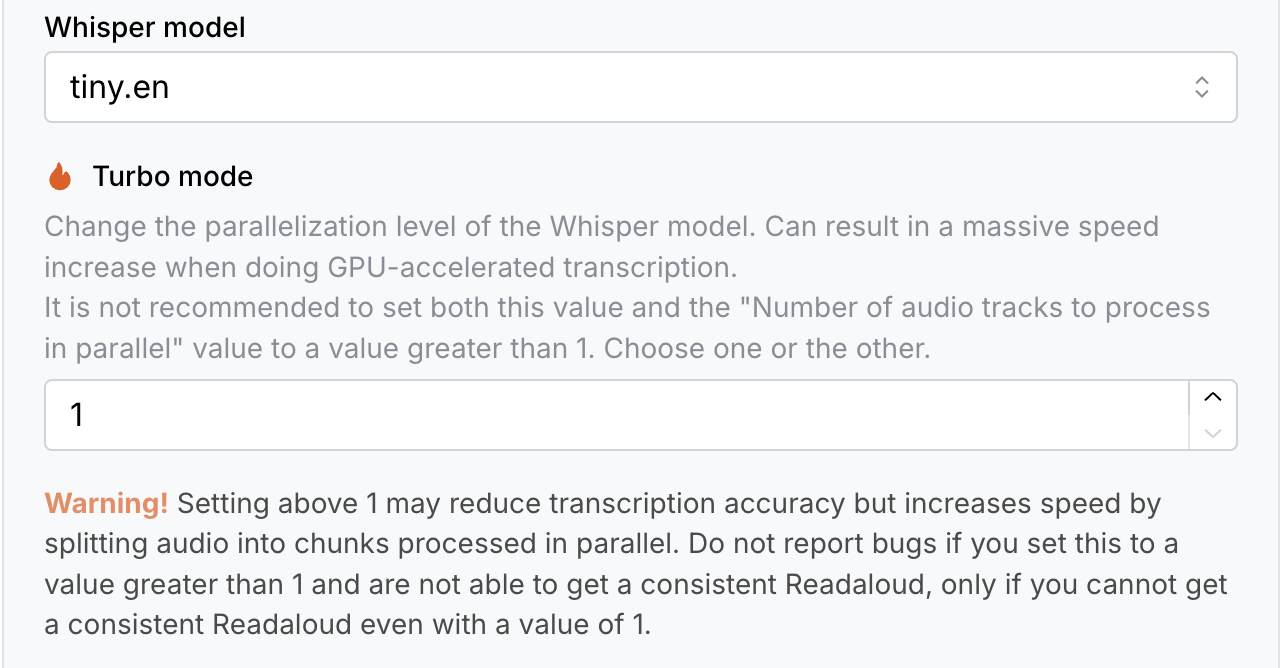
Storyteller v2.7.0 and later supports a "turbo mode" for the transcription
step. This chops up each chapter into smaller chunks and processes them in
parallel, which can massively speed up the transcription process.
There are some possible downsides to using turbo mode, however, which you should keep in mind before deciding to use it.
Reduced transcription accuracy
Reduced transcription accuracy. Transcriptions can be less accurate near boundaries of the chapters. For example, if you have set turbo mode to 4, you may have reduced accurary starting at a quarter of the chapter.
Issues can include:
- More and more noticeable offset in the timing of the readalong highlighting the text as the chapter progresses.
- The readalong highlight skipping text after crossing a chunk boundary.
- Short chapters being skipped entirely.
We are constantly working on improving the accuracy of turbo mode, and we will
update this section as we make progress. Only use turbo mode if you are accept
these possible issues, and realize that they can be fixed by simply setting
turbo mode to 1 and realigning the book. Please report any issues you
encounter with turbo mode to our Discord or
GitHub.
Incompatibility with Parallel processing
Turbo mode does not work well with the "Number of audio tracks to processing parallel" setting. You can experiment with setting either that or turbo mode to a value greater than 1 and figure out which gives the best speed over transcription accuracy.
Increased resource usage
See below on how to mitigate this by limiting resources. On CPU, it is not recommended to set turbo mode to a value greater than the number of CPU cores available.
Limiting resources
Please note that the transcription task will, by default, use as many CPU cores and as much RAM as is available, and Docker, by default, will give it access to all of the resources on your system. Given how long the transcription task can take, this is likely not what you want, especially if you are running other services on your system.
It's recommended that you use the --memory and --cpus flags on your
docker run command to limit the resources available to the API service
container. For example, the following will run the container with access to 24GB
of memory and 8 CPU cores:
docker run -v ~/Documents/Storyteller:/data -p 8001:8001 --memory=24g --cpus=8 registry.gitlab.com/storyteller-platform/storyteller:latest