Offloading transcription to another machine
You likely want to use this when
- You have a gaming PC and you are not running Storyteller on it
- You run Storyteller on a Mac Mini (or any Apple Silicon device)
A likely scenario you might find yourself in is having your main storyteller server run on either a VPS or a small power efficient server running in your home, like a Raspberry Pi, and you want to improve transcription performance.
Luckily, Storyteller supports offloading the transcription process to a different server / machine entirely.
To quickly spin up a transcription server, you can use ghost-story, which is
our wrapper that can automatically install the most appropriate whisper.cpp
binary for your system.
Setting up the host machine
We will run a version of whisper.cpp, which we also use to do local transcription, on your host machine of choice. This will allow Storyteller to use that host machine for transcription.
ghost-story is not yet available for Windows, please follow the community
guide for
compiling whisper.cpp from source
instead.
Prerequisites
You need to have node installed on your machine, ideally version 24.x or
higher.
- macOS
- Ubuntu/Debian
brew install node
sudo apt-get install -y nodejs
Installing ghost-story
You can install ghost-story globally using npm:
npm install -g @storyteller-platform/ghost-story
Installing whisper.cpp
You can install whisper.cpp using ghost-story:
ghost-story install binary
Ghost Story will automatically install the most appropriate whisper.cpp binary
for your system. If you want to install a specific variant, you can use the
variant option:
ghost-story install binary <variant> [--force]
By default, ghost-story will not install binaries it deems incompatible with
your system. You can use the --force option to override this behavior.
Available variants
darwin-arm64-coremldarwin-arm64-cpudarwin-x64-cpulinux-x64-cuda-13.1.0linux-x64-cuda-12.9.0linux-x64-cuda-11.8.0linux-x64-sycllinux-x64-vulkanlinux-x64-rocmlinux-x64-blaslinux-x64-cpulinux-arm64-cpuwindows-x64-cpuwindows-x64-cuda-13.1.0windows-x64-cuda-12.9.0windows-x64-cuda-11.8.0windows-x64-vulkan
Installing models
Now install a model using ghost-story:
ghost-story install model <model>
Available models
tinytiny.entiny-q5_1tiny.en-q5_1tiny-q8_0basebase.enbase-q5_1base.en-q5_1base-q8_0smallsmall.ensmall-q5_1small.en-q5_1small-q8_0mediummedium.enmedium-q5_0medium.en-q5_0medium-q8_0large-v1large-v2large-v2-q5_0large-v2-q8_0large-v3large-v3-q5_0large-v3-turbolarge-v3-turbo-q5_0large-v3-turbo-q8_0
Quantized models (-q5_1, -q8_0) are not available on MacOS when using the
coreml variant.
Starting the whisper server
Now we are ready to start the whisper server.
ghost-story server
This will start the whisper server on the default port 8080 with the default
model tiny.en.
USAGE ghost-story server [OPTIONS]

OPTIONS

  --model, -m          Whisper model (default: "tiny.en")
  --port, -p           Port to listen on (default: 8080)
  --host               Host to bind to (default: "0.0.0.0")
  --threads, -t        Number of threads (default: 4)
  --processors         Number of processors (default: 1)
  --no-auto-install    Don't auto-install missing binary/model (default: false)
  --variant            Use specific binary variant
  --force, -f          Force running even if platform doesn't match match the binary (default: false)
Increasing the number of processors may drastically speed up transcription (this is the equivalent of turbo mode when using local transcription), but it may also result in alignment issues. Please do not raise an alignment issue if you have increased the number of processors.
Configuring Storyteller
In the Storyteller settings, under "Transcription settings", set the following:
- "Transcription engine" to "
whisper.cpp (remote)" - "API Key" can be left empty or set to any string, as the local server does not require authentication.
- "Base URL" to the URL of the whisper.cpp server, for example
http://192.168.2.40:8080.
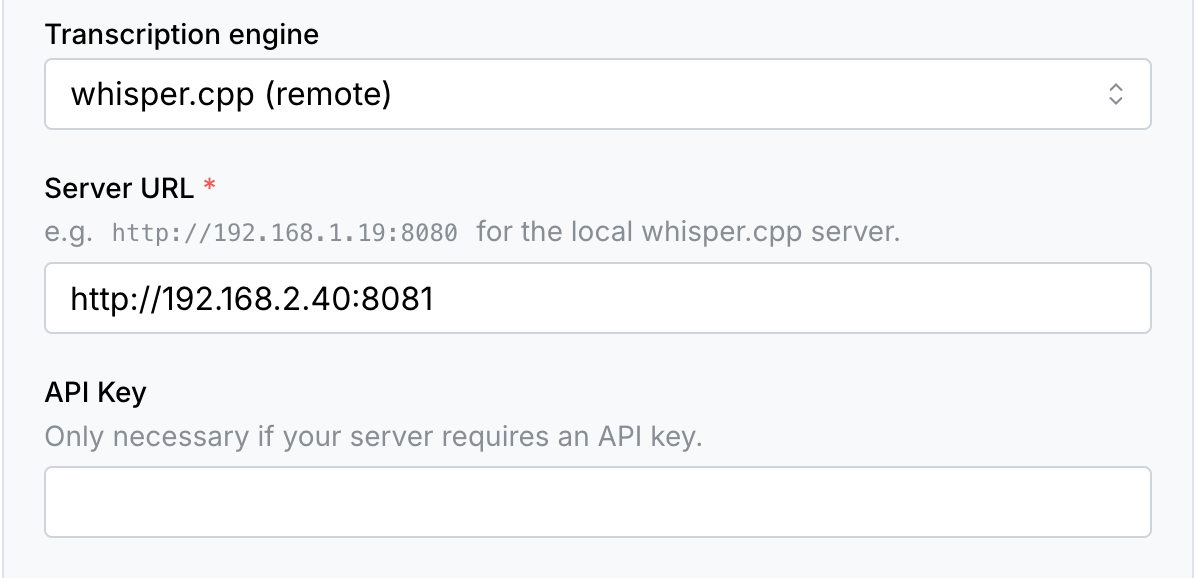
The default port is 8080 but you can change it with the --port flag.
Determining the server host
The base URL must contain the IP address or hostname of the machine running the whisper.cpp server.
Storyteller in Docker (macOS or Windows): use host.docker.internal as the
hostname.
Storyteller in Docker (Linux): run the container with
--add-host=host.docker.internal:host-gateway and use host.docker.internal,
or use --network=host and localhost.
Storyteller on the same machine: use localhost.
Storyteller on a different machine: find the server's IP address with
ifconfig (macOS) or ipconfig (Windows) and look for addresses starting with
192.168..